Payroll Software Cost for Small Business: What You'll Really Pay in 2026

Quick Answer
Most small-business payroll software costs a monthly base fee of $35 to $50 plus about $6 to $7 per person on the entry plan. For a 10-person team that's $95 to $120 a month at list price, or roughly $1,140 to $1,440 a year: Square Payroll $95, Gusto Simple and OnPay $109 each, QuickBooks Workforce Payroll $120[4][1][2][5].
Step up to plans with time tracking, HR tools or an advisor and the same team pays $200 to $400 a month. ADP and Paychex don't publish prices at all; you get a quote[7][9].
General information, not tax or legal advice. Prices are US list prices from each vendor's own pricing page, checked Oct 2026. Payroll prices change often, so confirm on the vendor's site before you sign up.
The first time you hire someone, payroll stops being a spreadsheet problem. Now there's withholding, deposits on a schedule, a quarterly federal return, W-2s in January and state filings on top. Payroll software exists so you don't have to learn all of that the hard way.
The good news? It's cheaper than most people expect. The catch is that nearly every provider prices it the same way, a base fee plus a charge per person, so the number on the pricing page tells you very little until you multiply it by your own headcount. Let's do that.
How Much Does Payroll Software Cost?
Here are the published prices, with the math already done for a 10-person team. Every figure comes straight from the vendor's pricing page.
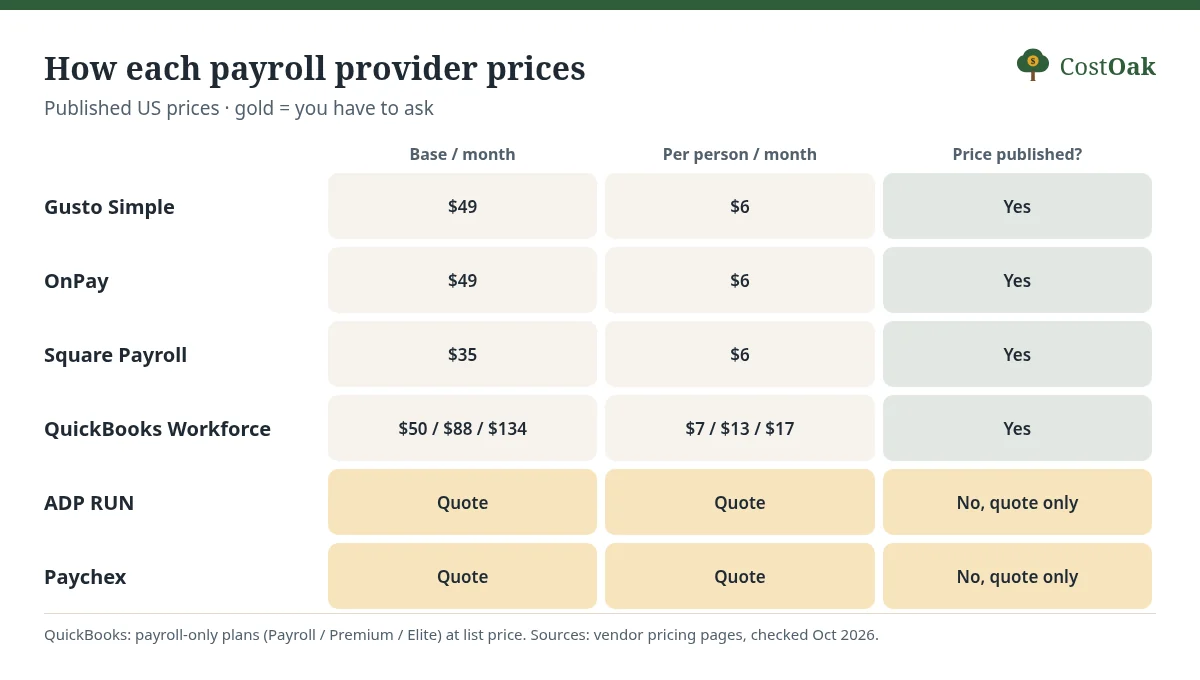
| Plan | Base fee / month | Per person / month | 10 people / month | 10 people / year |
|---|---|---|---|---|
| Square Payroll (full-service) | $35 | $6 per person paid | $95 | $1,140 |
| Gusto Simple | $49 | $6 | $109 | $1,308 |
| OnPay Payroll Essentials | $49 | $6 per worker | $109 | $1,308 |
| QuickBooks Workforce Payroll | $50 | $7 | $120 | $1,440 |
| Gusto Plus | $80 | $12 | $200 | $2,400 |
| QuickBooks Workforce Premium | $88 | $13 | $218 | $2,616 |
| QuickBooks Workforce Elite | $134 | $17 | $304 | $3,648 |
| Gusto Premium | $180 | $22 | $400 | $4,800 |
| ADP RUN | Quote only | Quote only | n/a | n/a |
| Paychex | Quote only | Quote only | n/a | n/a |
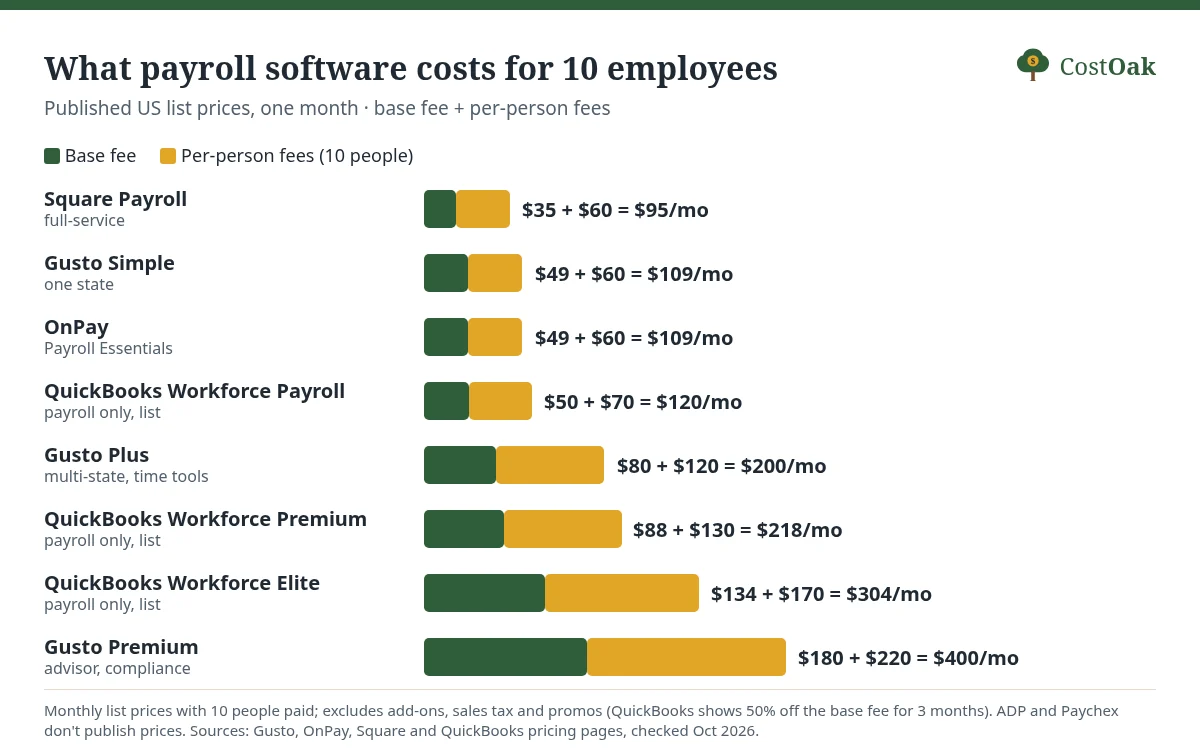
Look at the entry plans and you'll notice something: they're bunched together. Square, Gusto, OnPay and QuickBooks all sit within $25 of each other at 10 people. The real spread is between tiers. Gusto Premium costs more than three and a half times what Gusto Simple does for the same team, $400 against $109[1].
Notice too how the bill is split. On Gusto Simple, 10 people add $60 in per-person fees on top of the $49 base. Somewhere past eight employees, the per-person charges become the bigger half of your bill, and from then on every hire nudges your payroll software cost up by $6 to $7 a month.
What Payroll Costs for a 10-Person Business: A Worked Example
Say you run a landscaping company (an example) with 10 employees, all in one state, paid every two weeks. You want full-service payroll, meaning the software calculates the taxes, pays them and files the returns for you. Here's what a year costs at list price:
Square Payroll: $35 + (10 × $6) = $95 a month, or $1,140 a year[4]. Gusto Simple: $49 + $60 = $109 a month, $1,308 a year[1]. OnPay: the same $49 + $60, so also $1,308[2]. QuickBooks Workforce Payroll: $50 + $70 = $120 a month, $1,440 a year at list price[5].
QuickBooks was running a 50%-off-for-3-months promo when we checked, and it applies to the base fee only. So the first three months are $25 + $70 = $95, and year one comes to (3 × $95) + (9 × $120) = $1,365. Nice, but it's a $75 saving, not a reason to choose a provider.
What about a much smaller team? With 3 people, Square is $35 + $18 = $53 a month, Gusto Simple and OnPay $67, and QuickBooks Workforce Payroll $71. At that size the base fee is most of the bill, which is why Square's lower base matters more to a tiny shop than to a 20-person one.
Payroll software is a small slice of what an employee really costs you, by the way. The wages, the employer's share of Social Security and Medicare, unemployment tax and workers' comp are far bigger. Our Employee Cost Calculator adds those up for 2026.
Payroll Software Prices, Plan by Plan
Gusto
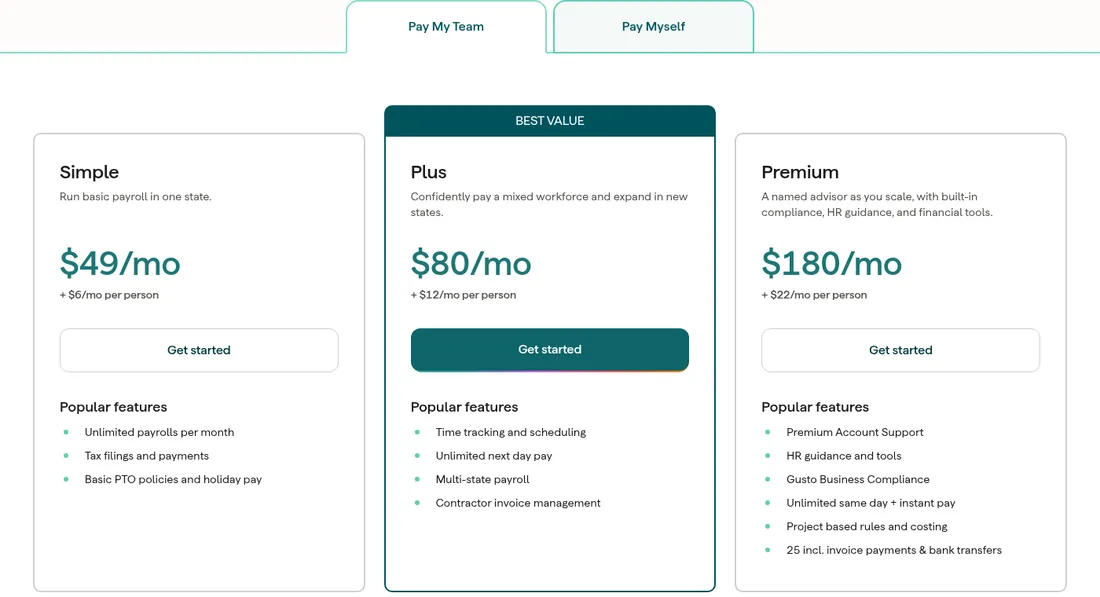
Gusto lists three plans for paying a team: Simple at $49 a month + $6 per person, Plus at $80 + $12 and Premium at $180 + $22[1]. Simple covers basic payroll in one state with unlimited payroll runs and tax filings. Plus adds time tracking and scheduling, unlimited next-day pay and multi-state payroll. Premium adds a named advisor, HR guidance and Gusto Business Compliance.
Two billing details are worth knowing. Gusto says it charges only for active employees, and it bills US contractors at your plan's per-person price only in months you actually pay them. It's also month-to-month with no long-term contract[1].
OnPay
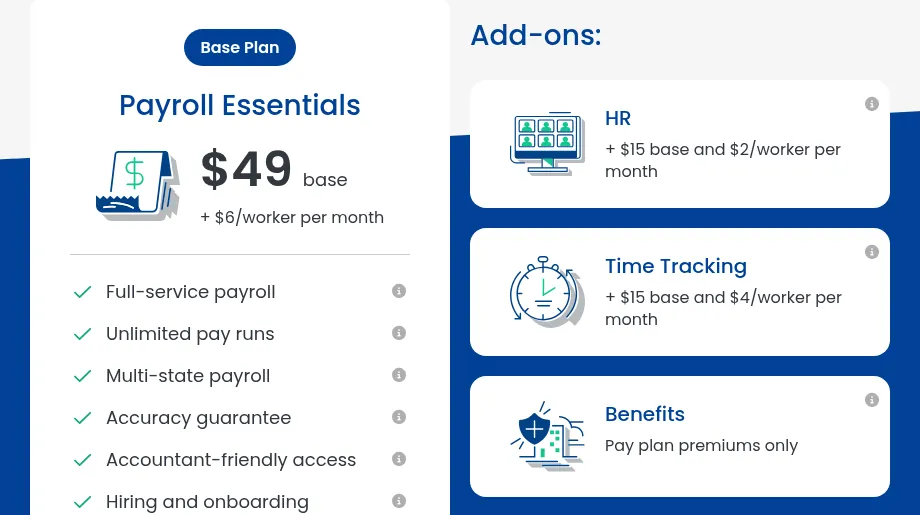
OnPay keeps it to one payroll plan, Payroll Essentials, at $49 base + $6 per worker a month, and it lists multi-state payroll, unlimited pay runs and tax filings as included. HR tools are an add-on at $15 base + $2 per worker, and time tracking is $15 base + $4 per worker[2].
The billing quirk: OnPay's per-worker fee applies to anyone included in a pay run during the previous month, even if their net pay was $0. Its own example is four people paid in March, so April's bill is $49 + $24 = $73[3]. Tidy up your pay runs and leave out people who didn't work.
Square Payroll
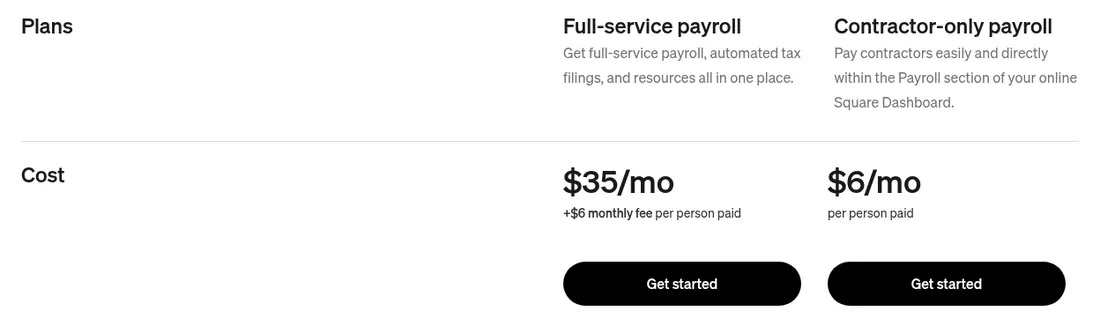
Square has the lowest list-price base fee we found: full-service payroll at $35 a month + $6 per person paid. If you only pay contractors, there's a contractor-only plan at $6 a month per person paid with no base fee[4]. Full-service includes automated federal and state tax filings, multistate payroll and timecard import from Square's point of sale, which is handy if you already use Square for POS.
One small extra: if you opt to mail paper copies of W-2s and 1099s, Square charges an annual fee of $3 per mailed form[4].
QuickBooks Payroll (Workforce)
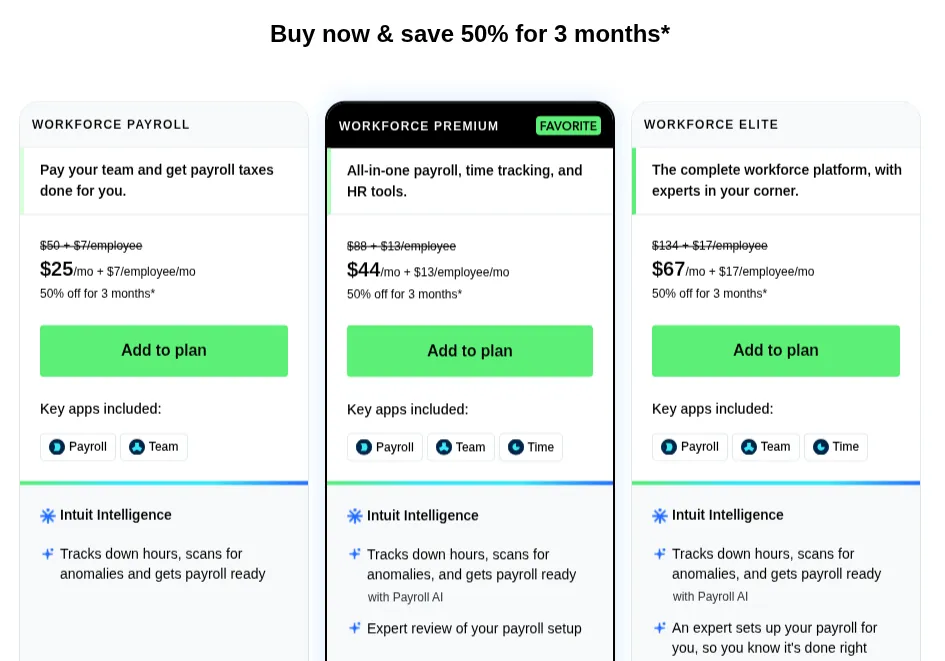
Intuit now sells payroll as QuickBooks Workforce. On its own, Workforce Payroll lists at $50 + $7 per employee, Workforce Premium at $88 + $13 and Workforce Elite at $134 + $17. Premium adds same-day direct deposit, time tracking and HR tools, and Elite adds expert setup and tax penalty protection[5].
If you also need accounting, Intuit bundles them: Workforce Payroll + Simple Start at $88 + $6.50 per employee, Workforce Payroll + Essentials at $125 + $6.50, and Workforce Premium + Plus at $203 + $10[6]. If your books are already in QuickBooks Online, keeping payroll there saves you a sync. If they aren't, compare it with your accounting options first (our cloud accounting comparison lays out QuickBooks, Xero, Zoho Books and FreshBooks).
How Much Do ADP and Paychex Cost?
We can't tell you, and neither will their websites. ADP's RUN packages page shows four packages (Essential, Enhanced, Complete and HR Pro), and each one has a "Get pricing" button instead of a price[7]. ADP says plainly that it takes "a different approach to quoting costs for RUN," and that it prefers to speak directly with small businesses to set a price[8].
Paychex is the same. Its four packages (Basic, Foundations, Advanced and Complete) each say "Request Pricing"[9]. When we checked, Paychex was advertising free payroll through April 2027 for new clients, but the terms require a one-year service agreement, and if you leave early Paychex says it can recover the value of the free months[10]. ADP had its own "3 months free" offer running too[7].
Quote-only pricing isn't automatically worse. A rep can bundle things you'd otherwise pay for separately. But it does mean you can't compare without a sales call, so get the published prices above first, then ask ADP or Paychex to beat them in writing, with every per-employee and per-payroll fee listed.
Add-Ons and Fine Print That Raise Your Payroll Bill
The base plan is where pricing pages start. It's not always where your bill ends up.
Take Gusto Simple. If your team needs faster pay, the Next-Day pay add-on is $15 a month + $3 per person, and Time & Attendance Plus is $6 per person after the free trial[1]. For our 10-person example that's $45 + $60 = $105 a month of add-ons, which takes Simple from $109 to $214. Gusto Plus, which lists time tracking and unlimited next-day pay among its features, is $200. So if you'd buy both add-ons, the bigger plan is the cheaper one.
OnPay works the same way. Payroll Essentials plus both the HR and Time Tracking add-ons comes to $49 + $15 + $15 = $79 base and $6 + $2 + $4 = $12 per worker, or $199 a month for 10 people. OnPay's own bundle of those three is shown at a discounted $70 base + $10 per worker, which is $170 for the same team[2].
Other things that can show up: same-day or instant pay charged per payroll on Gusto's lower plans ($90 and $100 per payroll), Gusto's state tax registration service, which it prices by state, and workers' comp policies, which are insurance and priced separately[1][4]. None of these are scandalous. They're just easy to miss when you're comparing $49 to $50.
Is Payroll Software Worth It for a Small Business?
Here's the honest case for it, in numbers.
First, the deadlines. Employers who withhold income, Social Security or Medicare tax generally file Form 941 every quarter, due April 30, July 31, October 31 and January 31, and the taxes themselves have to be deposited electronically on a monthly or semi-weekly schedule[13][14]. Miss a deposit and the IRS charges 2% of the unpaid deposit if you're 1 to 5 days late, 5% for 6 to 15 days, 10% after that, and 15% if it's still unpaid more than 10 days after a notice[11].
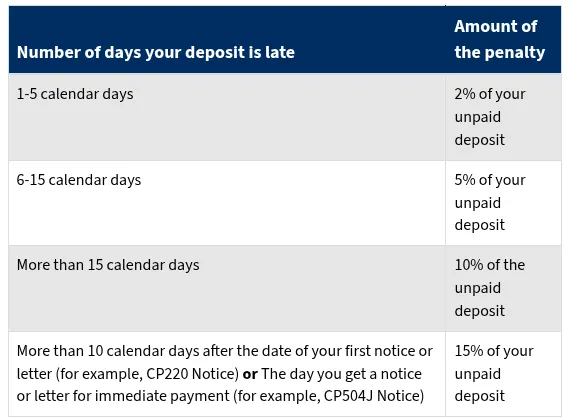
Put that in dollars. A $3,000 deposit (an example) made a week late costs 5%, or $150 in penalties. That's more than a month of Gusto Simple or OnPay for 10 people. One slip pays for the software.
Second, the alternative isn't free. In the National Society of Accountants' 2023 fee survey, preparers charged an average of $125 for a quarterly Form 941 and $93 for the annual Form 940[15]. Four 941s plus a 940 is $593 a year, and that's just the federal returns, not the paychecks, W-2s or state filings. Square's full-service plan for two employees is $35 + $12 = $47 a month, or $564 a year, and it handles all of that[4]. (More on preparer fees in our tax preparation cost guide.)
One thing software doesn't change: you're still on the hook. The IRS says the employer is ultimately responsible for depositing and paying federal employment taxes, even if a payroll provider makes the deposits, and it suggests registering for EFTPS yourself so you can check that payments are actually being made[12]. Do that. It takes a few minutes and it's free.
Which Payroll Software Should You Pick?
If you already sell through Square, start with Square Payroll. It's the cheapest published option we found and it pulls in timecards from your POS. If you're a one-state team that just needs paychecks and filings done right, Gusto Simple and OnPay cost the same at list price; OnPay includes multi-state payroll in its single plan, so it's the safer pick if you might hire in another state[2][1]. If your books live in QuickBooks Online, the extra $11 a month over Gusto Simple at 10 people buys you one less integration to babysit.
I'd only reach for the premium tiers (Gusto Premium, QuickBooks Elite) when you're paying for something specific, like an HR advisor or expert setup, and not because the comparison chart made the basic plan look thin. And I'd only call ADP or Paychex once I had a published price to hold up against their quote.
Before you sign up anywhere, you'll need an EIN, since hiring your first employee is one of the situations where the IRS requires one (see do you need an EIN?). And once payroll is running, add it to your monthly software budget. Our guide to small-business software costs and the Software Stack Cost Calculator put it next to everything else you pay for.
Frequently asked questions
How Much Does Payroll Software Cost per Month?
Entry plans from Gusto, OnPay, Square and QuickBooks list at a $35 to $50 base fee plus $6 to $7 per person a month, checked Oct 2026. For 10 employees that's $95 to $120 a month at list price.
What Is the Cheapest Payroll Software for a Small Business?
Of the providers that publish prices, Square Payroll's full-service plan has the lowest base fee at $35 a month plus $6 per person paid. If you only pay contractors, Square's contractor-only plan is $6 per person paid with no base fee.
How Much Does Gusto Cost for 10 Employees?
Gusto Simple is $49 a month plus $6 per person, so $109 a month for 10 people. Gusto Plus is $80 plus $12 per person ($200), and Premium is $180 plus $22 per person ($400), at list prices checked Oct 2026.
How Much Does ADP Payroll Cost?
ADP doesn't publish prices for RUN Powered by ADP. Each package on its site has a Get pricing button, and ADP says it prefers to quote small businesses directly. Paychex also quotes on request.
Do I Still Need an Accountant If I Use Payroll Software?
Full-service payroll software files the quarterly Form 941, the annual Form 940 and W-2s for you, which is the work a preparer would otherwise bill per form. Many businesses still use an accountant for their income tax return and advice.
Am I Responsible If My Payroll Provider Makes a Mistake?
Yes. The IRS says the employer is ultimately responsible for depositing and paying federal employment taxes, even when a payroll provider handles the deposits. It recommends enrolling in EFTPS so you can check payments yourself.
Sources
Prices are US list prices from each vendor's pricing page and IRS rules from IRS.gov, checked Oct 2026; preparer fees are national averages from the NSA's 2023 Income & Fees survey. We haven't run payroll on these products; this is a researched price guide. See our editorial policy, methodology and affiliate disclosure.
- [1] Gusto pricing: https://gusto.com/product/pricing (checked Oct 2026)
- [2] OnPay pricing: https://onpay.com/payroll/software/costs-pricing/ (checked Oct 2026)
- [3] OnPay Help Center: FAQ, account and billing: https://help.onpay.com/hc/en-us/articles/360046701252-FAQ-Account-and-billing (checked Oct 2026)
- [4] Square Payroll pricing: https://squareup.com/us/en/payroll/pricing (checked Oct 2026)
- [5] QuickBooks Workforce pricing (payroll-only plans): https://quickbooks.intuit.com/payroll/pricing/bundle/ (checked Oct 2026)
- [6] QuickBooks payroll pricing (payroll + accounting bundles): https://quickbooks.intuit.com/payroll/pricing/ (checked Oct 2026)
- [7] ADP: RUN Powered by ADP payroll packages comparison: https://www.adp.com/what-we-offer/payroll/payroll-for-1-49-employees/payroll-packages.aspx (checked Oct 2026)
- [8] ADP: Small business payroll pricing and cost transparency: https://www.adp.com/resources/articles-and-insights/articles/u/understanding-small-business-payroll-and-hr-platform-pricing-transparency.aspx (checked Oct 2026)
- [9] Paychex: Compare payroll packages and pricing: https://www.paychex.com/payroll/compare-payroll-solutions (checked Oct 2026)
- [10] Paychex: Small business payroll (promotion terms): https://www.paychex.com/payroll/small-business-payroll (checked Oct 2026)
- [11] IRS: Failure to Deposit Penalty: https://www.irs.gov/payments/failure-to-deposit-penalty (checked Oct 2026)
- [12] IRS: Outsourcing payroll duties: https://www.irs.gov/businesses/small-businesses-self-employed/outsourcing-payroll-duties (checked Oct 2026)
- [13] IRS: Employment tax due dates: https://www.irs.gov/businesses/small-businesses-self-employed/employment-tax-due-dates (checked Oct 2026)
- [14] IRS: Depositing and reporting employment taxes: https://www.irs.gov/businesses/small-businesses-self-employed/depositing-and-reporting-employment-taxes (checked Oct 2026)
- [15] National Society of Accountants: 2023 Income & Fees, Complete Report (PDF, © 2024): https://img1.wsimg.com/blobby/go/a15c5ffb-9439-4993-b38e-4acbf6145e32/2023%2BComplete%2BIncome%2Band%2BFees%2BReport.pdf (checked Oct 2026)